In modern office environments, “Efficiency” is becoming increasingly vital. Those who juggle work laptops and home desktops, or Windows devices and Mac computers, will know the struggle well,which refers to separate keyboards and mice, frequent clumsy cable swapping, and endlessly cycling monitor input sources. This is where a KVM (Keyboard, Video, Mouse) switch comes in to resolve all these issues at once.
The Modern Office Desk Dilemma
The traditional one-person-one-device setup is becoming more and more rare. Today’s workplace demands flexibility:
- Hybrid workers:Requiring secure access to company laptops while leveraging the powerful performance of personal desktops.
- Developers/Designers:Needing separate systems with different operating environments (Windows, Linux, Mac-OS) for coding, testing, and design tasks.
- Financial analysts:Monitoring real-time data on one device while running models on another.
- Content creators: Editing video on a high-performance workstation while managing communications and scripts on a silent secondary device.
How would KVM Perform in Desktop Environments?
The real value of a KVM lies in how it solves specific workflow challenges. While not for everyone, it can be transformative for users in these situations:
Dual-System Workflow
This is the most common scenario. With a simple 2-port KVM, one button press instantly transfers your monitor, keyboard, and mouse from your work laptop to your personal desktop. No cable swapping, no reaching for a different mouse, no waiting for your display to wake up. Switching between “work mode” and “personal mode” becomes truly effortless.
Multi-Platform Professional
For those who need native performance across different operating systems.Developers working across platforms, creatives using both Windows and MacOS, or engineers testing on multiple environments
,which makes KVM essential. You can dedicate a Windows machine for specific software, a Mac for design work, and a Linux box for development, all controlled from one central station.This setup eliminates the cost and clutter of maintaining multiple complete workstations.
Specialized Workflow Hub
Some users dedicate specific machines to specialized tasks: one for live streaming, another for trading or data monitoring, a third for daily operations. A multi-port KVM (typically 4 ports or more) becomes the command center that ties everything together. Instead of managing separate stations, you control all your specialized tools from one organized workspace, maintaining focus and efficiency.
KVM’s Productivity Advantage
The benefits of integrating a KVM switch translate directly into measurable productivity gains:
Reclaimed Time & Seamless Workflow
A KVM eliminates the cumulative minutes lost daily to manual switching. By making system transitions instant and effortless, it preserves your mental focus and maintains workflow continuity
with a critical foundation for sustained productivity.
Enhanced Focus & Ergonomic Efficiency
Consolidating to a single, high-quality peripheral setup reduces visual clutter and cognitive load. More importantly, it allows perfect ergonomic positioning of your keyboard and mouse, eliminating the physical strain of adjusting between multiple workstations during extended sessions.
Optimized Resource Investment
Rather than spreading your budget across multiple mid-tier setups, you can invest in one exceptional set of peripherals. Your preferred mechanical keyboard, precision mouse, and color-accurate monitor then serve all your systems, elevating performance and experience across every machine.
Streamlined Workspace Management
One set of peripherals means significantly fewer cables. The KVM acts as an intelligent hub, transforming cable chaos into an organized, professional workspace that’s easier to maintain and mentally freeing.
Built-in Security Separation
For handling sensitive data, a KVM provides a physical air gap between systems. You can securely work on isolated networks while freely accessing open resources on another machine without the crossover risks inherent in software-based solutions.
Product Recommendation
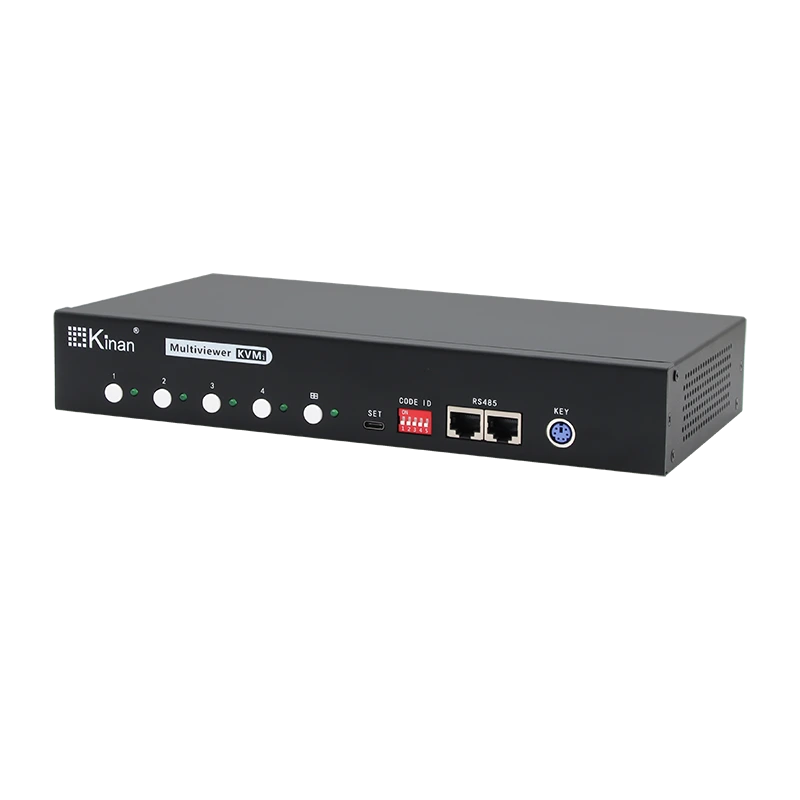
MH2404 is a 4-port multi-view KVM switch with a USB2.0 Hub. It allows users to monitor multiple sources from servers through one set of monitor, keyboard and mouse, and directly switch and select the servers to be operated and controlled in the screen through the keyboard, thus instantly updating the image and effectively improving the working efficiency of instantly monitoring the application situation.
- View Modes: Supports Quad View mode and full screen display mode.
- High-quality Video Resolution: up to 4K (3840 x 2160 @ 60 Hz).
- Boundless Switching: In the multi-screen mode, simply move the mouse cursor across windows and switch automatically.
- Daisy-chain Connection: Support daisy-chain and cascade connection.
Conclusion
Ultimately, a KVM switch is not about acquiring new gear—it’s about intelligently or chestrating the resources you already own. It eliminates the physical friction between your ideas and their execution across different systems.
In essence, the KVM transforms device management from a daily chore into a seamless experience. It converts a cluttered multi-device setup into a streamlined command center, reclaiming not just desk space, but more importantly, your time and attention. By optimizing how you interact with technology, it shifts your focus from managing machines to producing your best work, it’s the true efficiency Boosters.